The Attachment Is Not Always the Whole Document
Learn how to read a document attachment alongside its title, message and boundaries, so you can tell what it covers and where to seek missing context.
You open an email from a council office, see a file called “Decision.pdf”, and start reading. The first page refers to “the criteria set out above”, but there is no page above it. The message may contain the missing context—or the attachment may be an extract from a larger document. Reading an attachment well means noticing not only what the file says, but what its boundaries leave outside.
This seven-day routine helps you work out what an attached document is, what accompanies it and whether it appears complete. Each day has a distinct task, from reading the message to deciding whether the material is sufficient for your purpose. It is useful for public letters, guidance notes, meeting papers and service documents. A mail client, a PDF reader and a few careful notes are enough.
Why can an attachment feel complete when it is not?
A file looks self-contained because it has a name, a format and a visible first page. Yet the sender may be using it as one piece of a larger exchange. The email could identify who should read it, explain which version applies or point to a separate page where an action is described.
There are several kinds of boundary to watch for:
- Message boundary: the email or letter that carries the file, including its subject line and any instructions in the body.
- File boundary: the pages or sections present in the attachment, which might be a full document, an extract or an enclosure.
- Reference boundary: material the file points to elsewhere, such as an appendix, policy, form or online service page.
- Decision boundary: the point at which the attachment explains background but another document sets out what a reader must do.
These boundaries are not automatically signs of an error. A short extract can be exactly what a sender intends to share. The useful question is whether the surrounding material makes that scope clear.
What should you do on the first day?
Read the message around the attachment. Note the sender, subject line, date, intended recipient and any action requested. Then read the body from beginning to end, including text below the signature and any earlier message in the thread. A forwarded email can preserve useful context in the quoted text, though it can also contain outdated instructions.
Look for wording that defines the file’s role: “for information”, “complete and return”, “extract from the report”, “see attached schedule” or “the current version is available online”. Each phrase changes how you should interpret what follows. If the message says a form must be returned but the attachment appears to be guidance, keep those two purposes separate rather than assuming the file itself contains every required action.
Save the message and attachment together in a way that preserves their relationship. If you download the file, a nearby note with the sender, date and email subject can help you remember where it came from. Avoid renaming an official file so radically that its identity or version becomes hard to recover.
How can the title and opening pages establish scope?
On the second day, inspect the title page, header and opening paragraphs before reading closely. Compare the title in the email with the title inside the file. A message may call something “the application pack” while the attachment is titled “Guidance for applicants”; those names suggest different roles.
Check for an issuing organisation, document type, named audience, version label, contents page and stated purpose. Then notice whether the first page begins mid-topic, uses phrases such as “this section”, or refers to a previous discussion. A page number that begins partway through a sequence, or an opening paragraph that assumes earlier definitions, may suggest an extract. It does not prove one: numbering can be inherited from a template, so treat it as a clue to compare with other evidence.
Write down a plain description, such as “guidance note for applicants” or “selected pages from a committee report”. This is a working description, not an official replacement title. It keeps you from silently treating every file as a complete policy, decision or instruction.
What can the document’s edges tell you?
On the third day, examine the end as carefully as the beginning. Look for a closing statement, a list of appendices, a “continued” marker, references to attachments not present, or a final page that ends in the middle of a sentence or table. In a PDF reader, check the page thumbnails and page count, but do not treat a tidy last page as proof that nothing is missing.
Compare internal references with what you can see. If the text cites “Appendix B” and no such appendix appears, mark that gap. If it refers to a separate form or web page, record the exact name rather than searching broadly for something similar. A link may lead to a current service page, while a downloaded document may retain older wording; the discrepancy is a reason to ask which source governs the action.
Do not spend time trying to infer a missing page from a filename or a blank space in page numbering. That effort rarely resolves the uncertainty. Record the clue and seek the source or clarification instead.
How should you compare the message with the file?
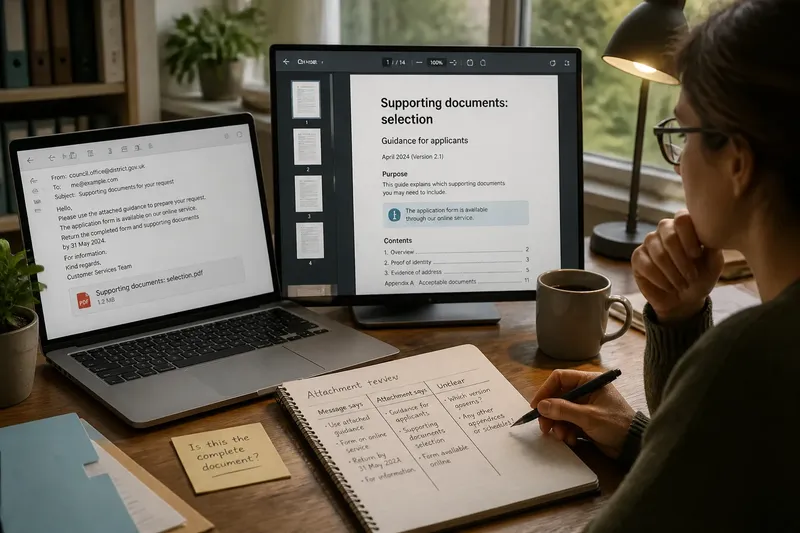
On the fourth day, make a small comparison note with three columns: what the message says, what the attachment says, and what remains unclear. This is not a verdict on which source is right. It is a way to keep claims separate and make a precise follow-up possible.
Say you receive an email saying, “Please use the attached guidance to prepare your request.” The PDF’s cover calls it “Supporting documents: selection”, and its last page says the application form is available through the council’s online service. Note that the attachment gives supporting-document guidance, while the form and submission route sit elsewhere. The expected result is a clearer account of which file answers which question, not an assumption that the email and PDF together constitute one complete document.
When wording conflicts, preserve both versions and note where each appeared. For a decision or deadline, ask the issuing office which document and version applies before acting on a guess. If the matter has legal, financial or other serious consequences, a qualified adviser may be appropriate.
What questions help when context is still missing?
Does a PDF count as a complete document?
Not necessarily: PDF describes a file format, not the scope of its contents. Look for a purpose statement, contents list, ending and references to material outside the file.
What does “attached for information” mean?
It generally signals that the file is being shared for awareness rather than as a request to complete or return it. Read the message for any separate action, and ask the sender if the intended use is unclear.
How do I tell whether an attachment is an extract?
Check for labels such as “extract” or “selected pages”, gaps in page numbering, mid-document openings and references to absent sections. Treat these as clues, then confirm against the message or issuing organisation.
Which source should I follow if the email and file disagree?
Do not choose based only on which one looks newer or more formal. Ask the sender or issuing office to identify the applicable version and preserve the answer with the relevant files.
What should you do before relying on it?
On the fifth day, turn your notes into a short record: who sent the material, what the attachment appears to cover, which other sources it names and what remains unresolved. If the file is part of an ongoing matter, keep the original email, attachment and any reply together. That record is more useful than a string of downloaded files with no visible connection.
On the sixth day, follow any named reference through the channel the sender provided. Check that the destination is from the relevant organisation and that its title or scope matches the reference. Do not assume that a similar-looking page or document is the intended one. If you cannot locate it, say exactly what is missing when you contact the sender.
On the seventh day, decide whether the material is sufficient for the purpose you have. If you only need background, a clearly labelled extract may be enough. If you must submit information, meet a requirement or understand a decision, confirm that you have the operative form, instructions or complete document—not merely a file that mentions them.
The phrase “the attachment” can hide several distinct sources: a message, a file, a referenced page and the action that follows. Reading each boundary deliberately makes the document easier to interpret without pretending that every missing piece can be reconstructed from the file alone. When you describe what you have, name its scope as well as its title; that small distinction gives the next reader a sounder starting point.