How to Read a Public Service Page Before You Act
Learn how to read a public service page for its route, requirements and likely next screen, so you can choose the right link before sharing details.
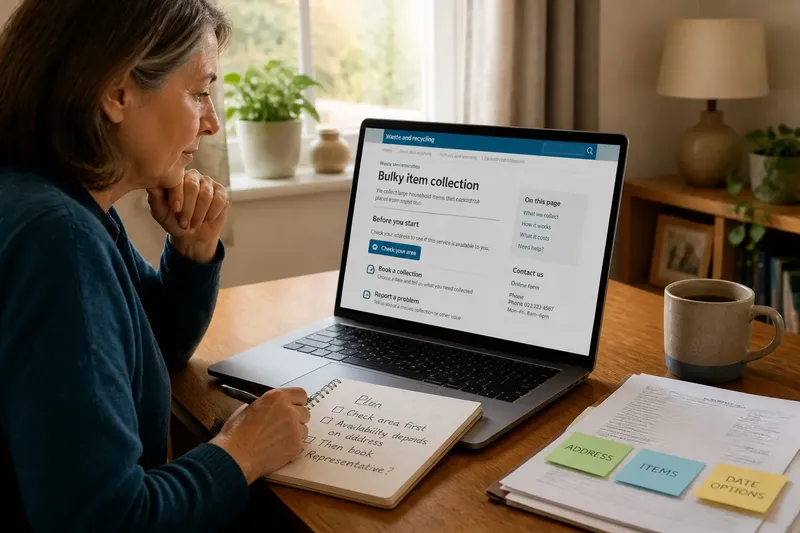
You open a council service page to arrange a bulky-item collection. Three links look plausible: one to check the service, one to book, and one to report a problem. Reading the page for its route—not just its headline—can help you choose the right link before you share details or start a request.
How can you tell what the page is designed to do?
Public service pages often combine a description, eligibility information, contact details and links to related tasks. The page title may name a department or a broad service, while your question concerns one specific action.
Read the title, opening paragraph and main heading together. Then describe the page’s purpose in a short phrase, such as “check collection availability” or “request a replacement permit”. Look for action headings such as “Apply”, “Book”, “Report” or “Check eligibility” to distinguish a transaction from general information.
Check the page’s boundaries before treating it as the route for your task. A service description may exclude certain items, cover only some areas or send readers to another page for bookings. A broad title alone does not establish that the page handles every part of the service.
Who is expected to use each instruction?
A page can address more than one audience. For example, a school transport page might give parents one instruction and school staff another. Words such as “you” can shift meaning between sections, especially when headings do not name the reader.
Notice who is named beside each action: an applicant, representative, account holder or service provider. Check whether the instruction concerns the person receiving the service, the person submitting a request, or an organisation acting on someone’s behalf. This matters before entering personal details or choosing a route.
Which link leads to the right route?
Look at the words around a button or link, not only its label. “Start now” may lead to a location check, an account sign-in or a full application. Nearby text can explain what the link opens and whether it is for a different stage or audience.
Follow the route in the order the page gives it, unless the page presents alternatives. Separate required actions from optional help, contact details and links to related services. If the page names a prerequisite, such as checking an address before booking, treat that as part of the route rather than as another equivalent choice.
Say you are helping a relative arrange a bulky-item collection, and the page offers “Check your area” and “Book a collection”. The opening text says availability depends on the address. You select “Check your area” first and enter the address only if the page asks for it; the expected observable result is either a service-availability message or a clear indication that the address is outside the service area. That result tells you whether to continue to booking or use another route.
Which details are worth checking before you continue?
Focus on details that can change your route or decision, rather than trying to interpret every unfamiliar phrase. Terms such as “resident”, “household” or “supporting document” may have a specific meaning on the page.
- Check whether the page names the area or address covered; if yours is included, continue with that route, but if it is excluded, use the alternative service named on the page.
- Check whether the instruction is for the service user or a representative; if it names your role, follow it, but if the role is unclear, pause before entering someone else’s details and use the page’s contact route.
- Check whether a listed document is required or merely suggested; if the page marks it as required, prepare it before proceeding, but if the wording is optional, continue without treating it as a condition.
- Check whether a link starts an application, sign-in or preliminary check; if it matches your task and audience, open it, but if it leads to another stage, return to the page and choose the relevant route.
- Check what the page says will happen after submission; if it describes a confirmation or further request, look for that next message, but if it gives no next step, use the stated contact route before assuming the request is complete.
- Check whether an unfamiliar term is defined nearby; if the definition fits your situation, apply it to the instruction, but if it could change your eligibility or action, ask the service team about that term before proceeding.
It is not worth following every broad policy link simply because it appears on the page. Follow a link when its wording could change which route you take, what you need to provide or what happens next.
What can you do when the page does not settle a decision?
How do I know whether this service covers my area?
Use any address or location check provided on the page, and compare its result with the service boundary stated there. If the page gives no way to check and the boundary affects your choice, contact the service team with the location question rather than guessing.
What should I do if two pages give different directions?
Check whether the pages address different audiences, locations or stages. If both appear to cover the same task, give the service team both page titles and ask which route applies to your situation.
What if I cannot tell what a term means here?
Quote the term and the sentence around it, then ask how it affects the action you are considering. This keeps the question tied to the decision instead of asking someone to interpret the whole page.
When should I stop reading and seek specialist advice?
For an ordinary service choice, stop when the page makes the route and its relevant conditions clear. If the decision also raises a legal, financial, health or other specialist concern, seek advice from a suitably qualified professional rather than relying on a general service page.
A useful final note can be brief: “This page checks collection availability by address; booking comes afterwards; I still need to confirm whether a representative can submit the request.” That record separates what the page says from what remains unresolved. A careful reading of a public service page is most useful when it leaves you with a clear next action—or a precise reason to pause.